
10 Vegetation Assets Worth Considering for Unity World Building

When you're building forests, mountain ranges, open fields, or stylized landscapes in Unity, vegetation is one of the harder categories to source well. A well-matched pack can save real production time. A mismatched one - wrong style, wrong pipeline, outdated shaders - can create more work than it solves.
This list covers ten vegetation packs from the Unity Asset Store across three visual styles: realistic, stylized, and low poly. It is not ranked or exhaustive. The goal is to help you shortlist candidates more quickly, with honest notes on what each pack appears suited for and what you should verify before buying.
Note: Pricing, compatibility, included content, and publisher support status change over time. Treat every entry here as a starting point, not a final verdict. Always check the current store page - including the last update date, supported Unity versions, render pipeline notes, and recent reviews - before purchasing.
How to Evaluate a Vegetation Pack
Before buying, run through these criteria:
Visual style fit: Trees and foliage carry a strong visual signature. A realistic pine will not sit naturally next to a low-poly stylized shrub. Lock down your art direction first, then filter by style.
Polygon and LOD structure: For open-world or large-scale environments, LOD support and draw call budget matter. Check the asset description and screenshots carefully - not every pack documents this clearly. Verify against your own performance targets.
Render pipeline support: Unity's pipeline landscape (Built-in, URP, HDRP) has fragmented many older assets. If a pack does not explicitly state your target pipeline, check recent reviews and the publisher Q&A before buying.
Unity version compatibility: The Asset Store lists a minimum Unity version, but that does not guarantee compatibility with current versions. Look at the "Last updated" date and recent buyer comments.
Wind and animation: Static foliage can look inert. Check whether the pack describes shader-based wind, a dedicated animation system, or no wind support at all.
Texture resolution and memory cost: Higher-resolution textures look better up close but cost more memory. Factor in your target platform.
The Curated List

This pack is aimed at production-quality forest scenes rather than quick blockouts. Based on its store presentation, it appears to include multiple tree types, ground cover, and understory vegetation oriented toward a naturalistic look. Verify the species and asset list on the store page to confirm they match your biome needs, and check render pipeline support and LOD structure before committing.

Where the Forest Environment pack focuses on woodland, this companion pack appears to target higher-elevation plant life - the kind of sparse vegetation suited to rocky or snow-adjacent terrain. Verify the included assets match the specific altitude biome you are building, and confirm the visual style pairs with any terrain or rock assets you are already using.

This pack's name suggests it is intended to work across Unity's render pipelines rather than targeting one specifically. Pipeline compatibility is a real friction point with vegetation assets. Verify on the store page what pipelines are actually supported and whether that matches your setup before drawing any conclusions from the name.

Most vegetation packs rely on shader-based wind. This pack appears to take a different approach to tree animation - verify the animation method on the store page to understand what that means for your workflow, performance profile, and whether the approach is viable at the asset density your scene requires.

This is one of the older broadleaf tree listings on the store. Its age means there is more historical buyer feedback to inspect, which can help surface real-world compatibility issues - though it also means more uncertainty around current pipeline and version support. Check the last update date and read recent reviews carefully before purchasing.

Ground cover is easy to underallocate in a vegetation budget, and it has a noticeable effect on how a landscape reads at eye level. Grass rendering is performance-sensitive - verify whether the assets work with your preferred grass rendering approach, check render pipeline support, and review recent buyer feedback for performance notes specific to your target platform.
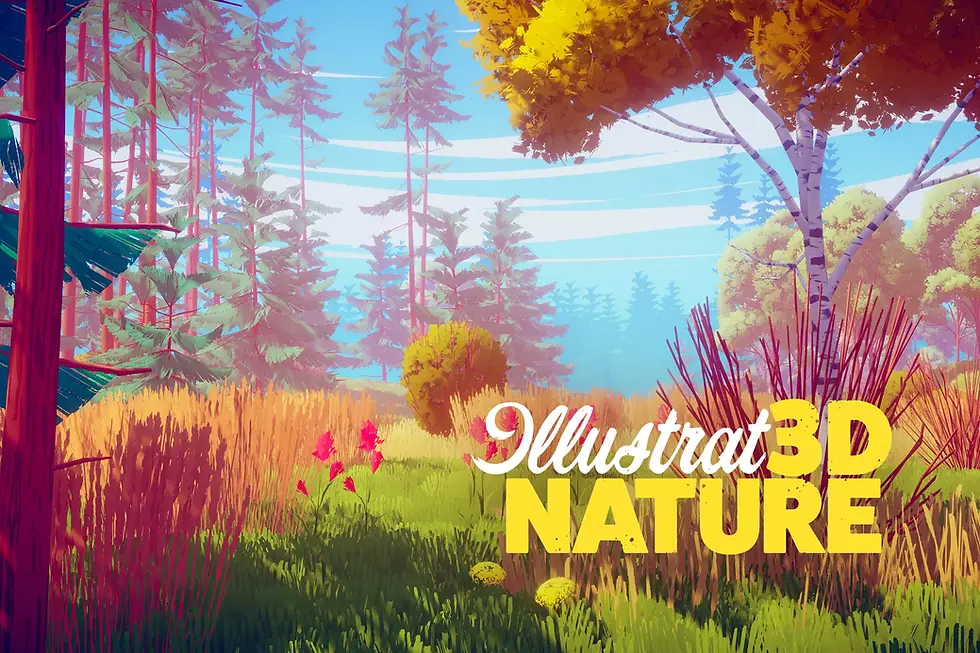
This pack sits between photorealism and flat low-poly. The visual approach appears to draw from illustrated or hand-painted references rather than photographic sources. If your reference material includes hand-painted RPGs or painterly indie games, this pack's style may fit - review the store screenshots against your existing art direction to judge.

This pack takes a clearly stylized approach - saturated, readable, and suited to fantasy or non-realistic game worlds. It is an older listing, which means more historical buyer feedback to inspect but also more uncertainty around current compatibility. Verify pipeline support carefully before purchasing.

Synty's POLYGON series is a well-established family of low-poly assets with a consistent flat-shaded style. If you are already using other POLYGON packs, this one is designed to fit that ecosystem. The style is distinctive - confirm the included plants and trees match your needs, and verify pipeline support before committing.

A straightforward low-poly tree pack with a clean style. It has been on the store long enough that there is more historical buyer feedback to inspect - useful for spotting compatibility issues, though the same age also means more uncertainty around current pipeline support. Check the last update date and recent reviews before purchasing.
How to Choose the Right Pack for Your Project
Match visual style before anything else: Mixing realistic, stylized, and low-poly assets in the same scene is difficult to pull off. Settle your art direction first, then filter by style category.
Verify before you prototype: Rather than importing a pack speculatively, check the store page for documentation quality, the publisher's response to recent support questions, and the last update date. These are often faster initial signals than importing and discovering issues after the fact.
Think in layers: Most environments need at least three vegetation layers: canopy trees, mid-height understory plants, and ground cover. No single pack covers all three well. Budget for more than one pack if your scope requires it.
Check publisher activity: A pack last updated three years ago with no publisher responses in the Q&A section carries more risk than one from an active publisher. This is especially true for assets you will depend on heavily.
Read one-star reviews first: They surface real friction - pipeline failures, broken imports, missing features - faster than the average rating does.
Buy for coverage, not count: A pack with 200 assets is not automatically better than one with 30 if those 30 are exactly what you need. Avoid paying for variety you will not use.
Conclusion
Vegetation assets are a meaningful investment in environment-heavy projects. The ten packs listed here span realistic, stylized, and low-poly categories, covering a range of use cases from open-world woodland to mobile-friendly stylized landscapes. None of them will suit every project, and none of them should be purchased without checking current store details first.
Use this list as a shortlist to investigate further, not a purchasing recommendation.
All images shown in this post are property of their respective asset authors and are used here for promotional purposes only.
Disclosure: This post contains affiliate links. If you purchase an asset through a link on this page, the author may earn a commission at no extra cost to you. All recommendations are based on publicly available store listings and editorial judgement - not commercial relationships with publishers. Information may be out of date; always verify current Unity version compatibility, render pipeline support, pricing, and recent reviews on the Asset Store page before purchasing.


Comments